Can a One Page website rank well on Google? Yes. But there is a catch…
A One Pager gives Google one URL to understand, while a traditional website can spread services, case studies and keywords across multiple pages.
So that single page needs focus. Your content, headings, images and code must all tell the same story.
Good news: you don’t need to turn your beautifully minimal website into a 10,000-word SEO monster.
Here are seven practical tips to improve your One Page website SEO.
Tip 1: Choose one clear search topic
Let’s start with the most important decision: what should this page rank for?
✅ Webflow agency for SaaS startups
✅ Freelance brand designer in Berlin
✅ Shopify design studio for fashion brands
🚫 Creative services
🚫 Design, branding, marketing and development
The narrower topic gives you a stronger foundation.
A One Pager can comfortably explain one focused service to one audience. It struggles when trying to rank for branding, packaging, web design, animation, app development and social media marketing all at once.
Related services are fine. Random services added only to capture more keywords are not.
Quick test: Can you explain what you do, who you help and what makes you different in one sentence?
If not, keep refining. This sentence will influence your hero copy, page title, headings and project selection.
Tip 2: Say what you do above the fold
Designers love an intriguing statement:
We shape tomorrow.
Looks great at 96px in a tasteful serif. Unfortunately, a first-time visitor still has no idea what you sell.
Try pairing personality with clarity:
We shape tomorrow with bold brands and fast Webflow websites for climate-tech startups.
Now we are getting somewhere.
Your opening section should tell visitors:
- What you offer
- Who it is for
- Why they should keep scrolling
- What action they can take next
The same clarity helps Google understand the page.
Google can use your page title, main heading and other prominent text when creating the clickable title shown in search results. Keep these elements aligned instead of describing the business three different ways. Read Google’s title-link recommendations.
Homework: Show someone your hero section for five seconds. Hide it and ask what the business does. If they hesitate, the copy needs another round.
Tip 3: Structure the scroll and its navigation
A long page needs a clear route through it.
A useful agency structure is:
- Introduction
- Selected work
- Services
- Process
- Testimonials
- FAQs
- Contact
Use one clear <h1> for the main page topic, followed by descriptive <h2> headings for major sections.
Compare:
✅ Brand Strategy and Visual Identity
✅ Web Design and Webflow Development
✅ Our Four-Step Design Process
🚫 What We Do
🚫 Our Magic
🚫 Good Stuff
Now give each important section a unique ID, such as:
#work#services#process#faq#contact
Your navigation can send visitors directly to the information they need. Use real HTML links with descriptive labels:
✅ View our Webflow services
🚫 Discover
🚫 Click here
Descriptive headings help visitors skim the page, while section links make a long One Pager easier to explore and share. Google also recommends preserving URL fragments when supporting links to specific parts of a page. Read its guidance on snippets and deep links.
Real-world example: Mammut Studios uses clear links to its work, services and contact sections. Structured headings, service descriptions, testimonials and FAQs add useful context throughout the scroll.
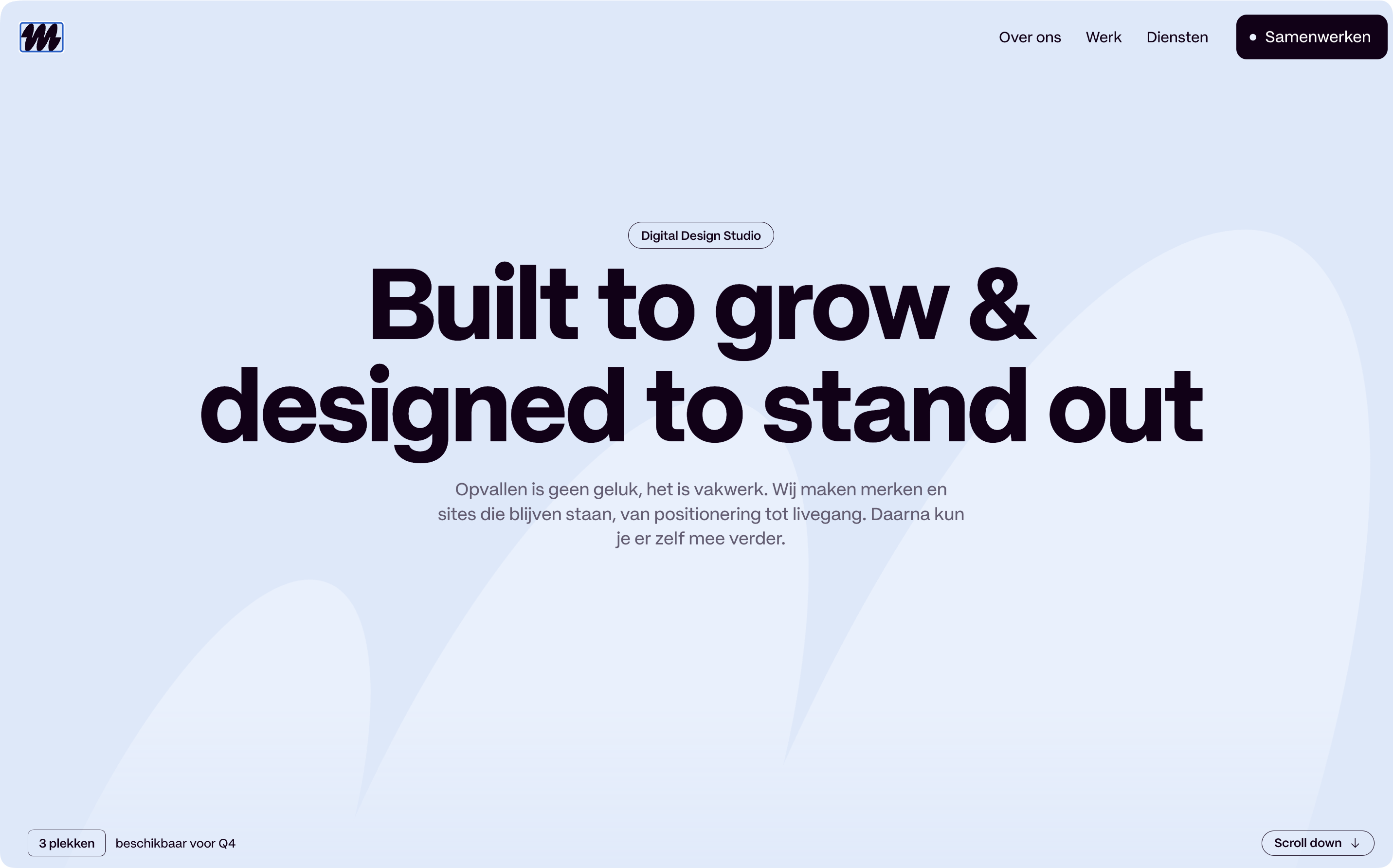
The creative effects enhance the experience without hiding the important content. Lovely stuff.
Tip 4: Add useful context to your work
A full-screen mockup might say a thousand words to another designer.
Google is going to need a few actual words too.
For each featured project, briefly explain:
- Who the client is
- What problem they had
- What you delivered
- What changed after launch
Compare:
Branding and website for Supernova.
with:
We repositioned Supernova for enterprise buyers, then created a flexible identity and conversion-focused Webflow website for its international launch.
The second description adds useful context without becoming an essay.
Specific results add even more credibility:
- Demo requests increased after launch
- Publishing time dropped from two days to two hours
- The redesigned site achieved a 95 accessibility score
Only use figures you can verify. “Increased engagement by 300%” means very little when there is no explanation of what was measured.
Testimonials can add credibility too, especially when placed beside the project or service they support. Our tutorial on three common testimonial mistakes explains why specific testimonials beat generic praise.
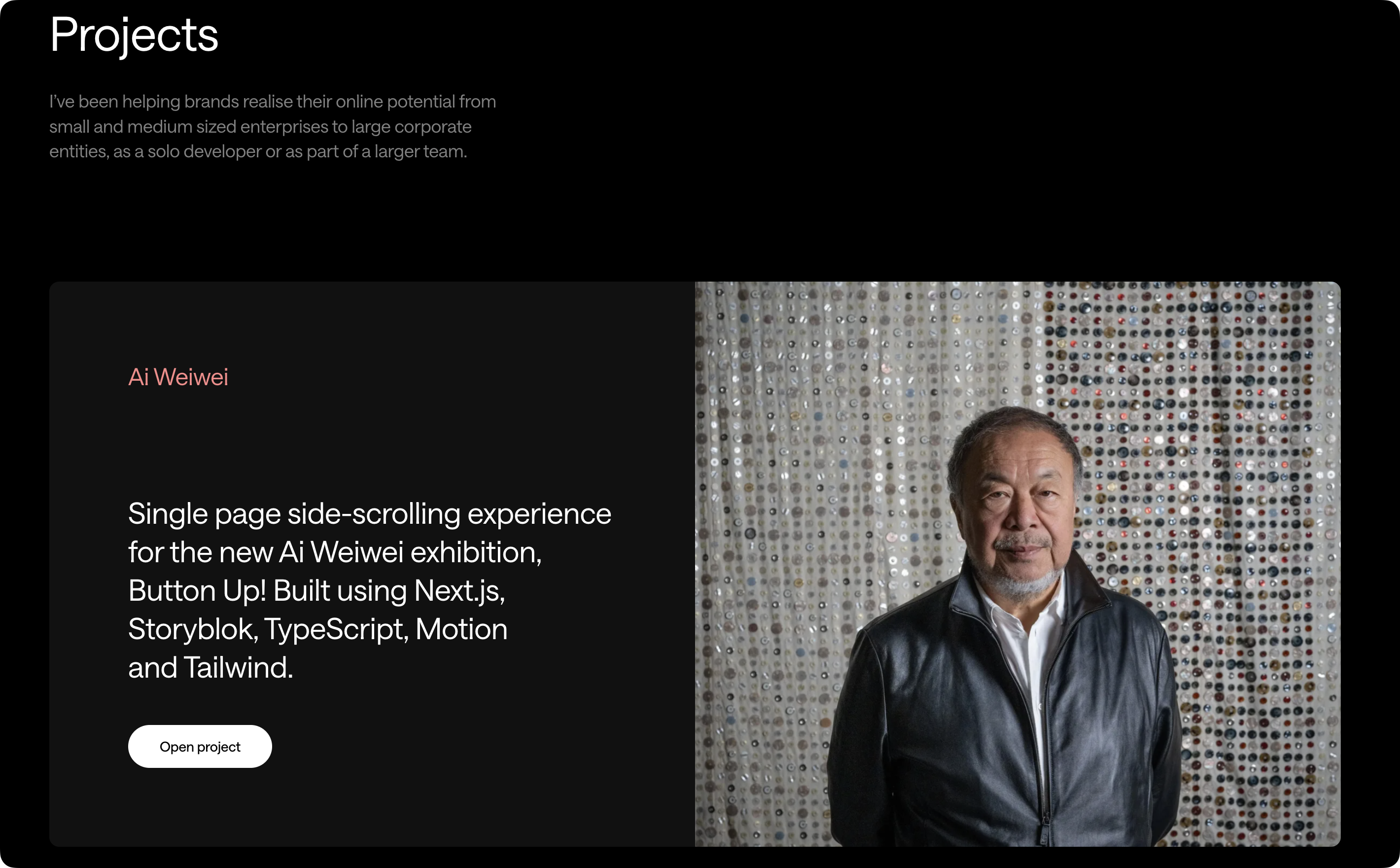
Real-world example: Michael Pumo’s portfolio adds useful context to selected projects, including what was built and the technology used. Named testimonials, service information and FAQs support the visual work with actual words.
Tip 5: Write your Google shopfront
Your search result is often the first interaction someone has with your studio.
Give the page a clear title:
✅ Webflow Agency for SaaS Startups | North Studio
✅ Independent Brand Designer in Berlin | Mia Chen
🚫 Home
🚫 We Make Ideas Happen
🚫 Design Agency Web Design Branding Best Agency
Keep the primary topic near the front, then add your brand name.
Next, write a useful meta description:
Independent Berlin studio creating strategic brands and fast Webflow websites for early-stage technology companies.
Think of this as a tiny pitch. Explain what you offer and who it is for. There is no need to squeeze every keyword into it.
Google may rewrite the title or description when another part of the page better matches a search. That is normal. Clear metadata still gives it a strong suggestion.
Google’s advice is refreshingly simple: make titles descriptive and concise, and make descriptions accurately summarize the page. Read its guides to page titles and search snippets.
Tip 6: Keep important content fast and accessible
We all enjoy a silky page transition.
We enjoy it less when it takes eight seconds before the menu works.
Your main headings, project descriptions, links and contact details should exist in the page’s HTML. Do not make visitors or search crawlers complete an interactive experience before receiving the basic information.
Watch out for:
- Long loading sequences
- Text created only after JavaScript runs
- Navigation hidden inside an ambiguous object
- Project details revealed only on hover
- Buttons without real links
- Copy embedded inside images
Google can process JavaScript, but rendering is a separate stage from crawling. Server-rendering or pre-rendering important content can make it available sooner. Google explains this in its JavaScript SEO guide.
Then put the page on a diet:
- Compress large images and video
- Limit font files
- Lazy-load media below the fold
- Defer non-essential scripts
- Give images fixed dimensions
- Test the live page on mobile
Google’s current “good” Core Web Vitals targets are:
- LCP: 2.5 seconds or less
- INP: 200 milliseconds or less
- CLS: 0.1 or less
These targets should be met at the 75th percentile of real visits on mobile and desktop. See the Core Web Vitals guide.
Finally, help search engines understand important images with descriptive filenames, supporting copy and meaningful alt text.
Compare:
🚫 final-image-07.jpg
✅ supernova-saas-dashboard-redesign.jpg
And:
🚫 alt="best UI UX web design agency"
✅ alt="Supernova analytics dashboard with a modular card layout"
Decorative images normally need empty alt text. A screen reader does not need to announce “purple blur number three.”
Alt text is a description—not a hidden keyword cupboard.
Google’s SEO Starter Guide explains how descriptive alt text and nearby copy help search engines understand images.
Tip 7: Cover the technical basics
A stunning One Pager can disappear from search because of one tiny setting.
Before launch, check that:
- The page returns a successful
200response - HTTPS works correctly
- There is no accidental
noindexdirective robots.txtdoes not block important content- The page has one preferred canonical URL
- Mobile visitors receive the full content
- Broken URLs return a proper
404response - The XML sitemap contains the correct URL
- Google Search Console is connected
- Analytics and enquiry tracking work
For a true One Page website, the sitemap might contain only one main URL. That is perfectly fine. Do not create useless pages to make the site look busier.
Google explains that a sitemap communicates your preferred URLs, although submitting one does not guarantee crawling or indexing. Read its guide to building and submitting a sitemap.
If suitable, add accurate structured data for the designer, agency or local business. Structured data can help Google understand the page and may make it eligible for richer search appearances. It does not guarantee a ranking boost. Start with Google’s structured data introduction.
When should a One Pager become a multi-page website?
Your website does not need to remain one page forever.
Consider adding pages when:
- Individual services answer different search needs
- Case studies need more breathing room
- You work across distinct industries
- Visitors need detailed pricing or process information
- You are publishing helpful articles
- Search Console reveals demand for additional topics
- Your team, careers or studio story needs a dedicated home
Keep the homepage focused, then add useful pages with purpose.
A dedicated Webflow services page can explain that service properly. A SaaS case study can be discovered and shared independently. A thoughtful article can answer a question your homepage should not attempt to cover.
More pages are not automatically better. More useful pages are.
Your One Page SEO checklist
Before hitting publish:
-
Define one audience and primary search topic
-
Explain the offer above the fold
-
Write one descriptive
<h1> -
Give each major section a useful heading
-
Add anchor links to important sections
-
Explain the work behind portfolio images
-
Write a clear page title and meta description
-
Keep important content in the HTML
-
Compress images and video
-
Add meaningful alt text
-
Test speed and usability on mobile
-
Check indexing and canonical settings
-
Connect Google Search Console
-
Remove anything created only to manipulate rankings
A good One Page website has one clear job.
SEO is not about stuffing more into it. It is about removing confusion, adding useful context and helping the right visitor find what they need.
Define your audience. Explain your offer. Show the work. Back it up. Then deliver everything quickly.
Easy right? Start with Tip 1 and work your way down.
Your website—and your future visitors—will thank you.
Much love,
Piet
Twitter: @PietTerheyden
Email: [email protected]